Keep a chord
Lock a chord position before generating again when you want it to remain part of the next variation.
Guitar songwriting and practice tool
StrumForge generates four-chord progressions made for guitar. Choose a key, mode, style, and chord type, then hear the loop with groove playback while following the guitar diagrams. Keep the chords that work, replace the ones that do not, and try different voicings without rebuilding the progression from scratch.
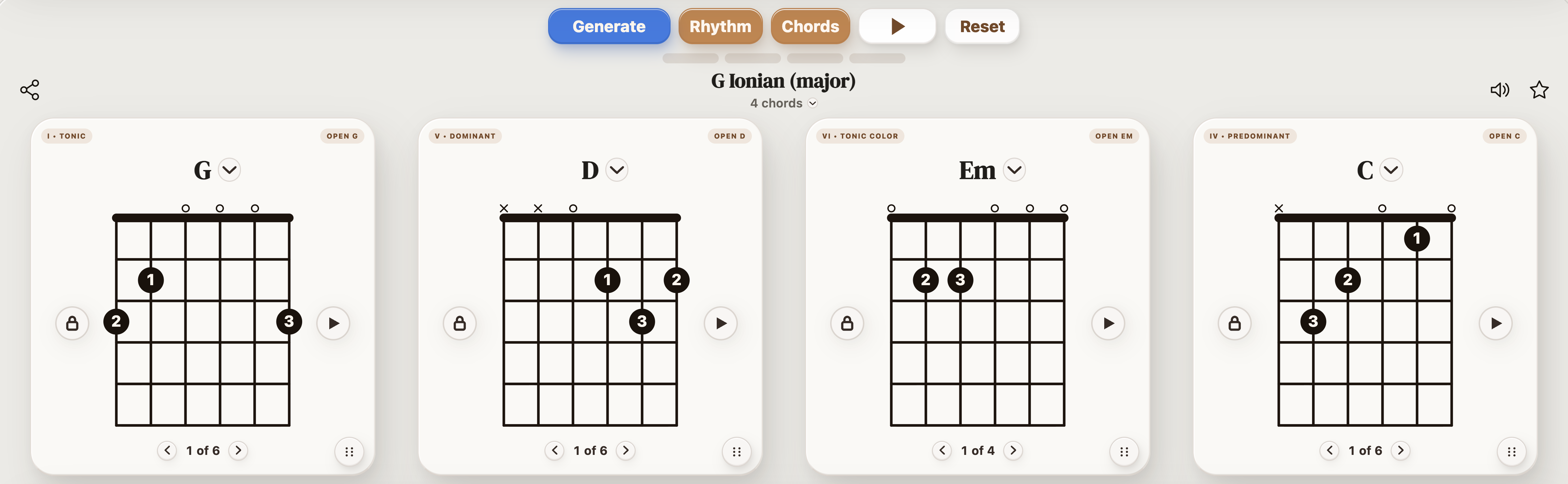
These fixed examples demonstrate different ways to use the generator. Each one contains exactly four chord positions.
StrumForge creates one four-chord loop at a time. Each result includes guitar diagrams and playback controls, so you can judge the progression by how it sounds and how the chord changes feel under your fingers.
Leave the key open when you want a broad starting point, or select a key and mode when you want the harmony to stay within a particular sound. Chord filters determine which types of guitar shapes and chord colors can appear.
| If you want to… | Start with… |
|---|---|
| Practice familiar chord changes | A guitar-friendly key, Auto or Ionian mode, Open chords, and a slower tempo |
| Find an unexpected songwriting idea | Key set to All, Mode set to Auto, several chord families enabled |
| Practice movable shapes | Barre, Triads, or Power chords |
| Add more harmonic color | 7ths and Sus / add9 enabled |
| Improvise over a loop | Select a key and mode, then open the related scale or pentatonic diagram |
| Improve one difficult transition | Lock the other chord positions and replace or regenerate the chord causing the problem |
Select a specific key when you want a defined tonal center. Leave Key set to All when you want StrumForge to choose from the available keys.
Use Auto for a broad selection of progression types, or select one or more modes when you want a particular harmonic framework.
Enable Open chords for familiar full shapes, Barre chords for movable voicings, Triads for compact shapes, or Power chords for root-and-fifth movement. Enable 7ths or Sus / add9 when you want those supported chord colors to appear.
Select Generate to create a four-chord progression. Use the chord and rhythm playback controls to hear the loop with the selected groove, meter, guitar sound, and tempo.
Lock any chord position you want to keep. Replace individual chords manually, drag the four cards into a different order, or cycle through available voicings for the same chord.
Open the scale or pentatonic view when you want to improvise, write a riff, or understand the notes surrounding the progression. Treat the diagrams as a visual reference.
StrumForge introduces variation within its progression system instead of selecting four completely unrelated chord names. The active key, mode, style, and chord options influence the result, while the diagrams ensure that each displayed chord has a supported guitar voicing.
Want the widest possible variation? Read the guide to using the random guitar chord generator.
Lock a chord position before generating again when you want it to remain part of the next variation.
Select the chord name to choose a different supported chord for that position. The guitar chord maker guide covers manual chord selection and voicing comparison in more detail.
Drag the cards to test whether the same four chords work better in a different sequence.
Use the voicing controls to cycle through available guitar shapes for the same chord. A new voicing changes where and how the chord is played without changing its harmonic name.
Adjust tempo, meter, groove, and guitar sound to hear how the same progression responds to a different rhythmic setting.
Lower the tempo and loop all four chords. If one transition remains uneven, practice only those two chords before returning to the complete loop.
Repeat the progression while testing a vocal melody, guitar riff, or rhythmic motif. Change one chord only when the existing loop gives the melody nowhere useful to go.
Choose a scale diagram related to the selected key and mode, then listen for how individual notes interact with each chord. A diagram is a reference, not a guarantee that every note will sound equally resolved.
Play the same progression with open chords, movable barre shapes, or smaller triads where supported. This keeps the harmony consistent while changing the register and fretting-hand movement.
Chord names do not reveal timing, rhythm, or how strongly one chord leads into the next. StrumForge plays the progression with the selected guitar sound and groove while highlighting the active chord card.
Use the tempo control to slow down difficult changes. Turn the chord or rhythm audio on and off independently when you want to focus on your own rhythm playing.
For broader study, visit the guitar chord progressions hub, guitar songwriting hub, guitar practice app, guitar keys, or guitar modes.
StrumForge generates four-chord progressions, with eight- and twelve-chord progressions available in Pro. You can reorder them, replace individual chords, lock positions, and generate another variation.
The web generator is free to start without ads. Free generation limits may apply, while StrumForge Pro includes unlimited generation and additional features.
Yes. Select a specific key or leave Key set to All. You can use Auto where available or select one or more modes to guide the harmonic framework.
The available options are Open, Barre, Triads, Power, 7ths, and Sus / add9. The exact voicings available depend on the chord and the active settings.
Yes. Lock any chord positions you want to preserve, then generate another progression. The locked positions remain in place when possible.
You can manually replace individual chord positions with supported chords and drag the cards into a different order.
Yes. StrumForge includes chord playback, rhythm playback, meter selection, tempo control, guitar sounds, and visual highlighting of the active chord.
Yes. Every displayed chord uses a supported guitar diagram, and you can cycle through other available voicings for the same chord.
Yes. Mode, pentatonic, blues, and CAGED scale views are available where supported. Use them as fretboard references while listening to how the notes interact with the progression.
No. StrumForge creates four-chord progressions and provides guitar, rhythm, and scale tools for developing them. It does not automatically generate a complete song or arrangement.