

StrumForge

Available on web, iPhone, iPad & Android

A guitar practice app for chords, scales, and better timing.

StrumForge brings chord progression playback, scale practice, triad and arpeggio trainers, a metronome, and a guitar tuner into one cross-platform app. Practice in your browser or on iPhone, iPad, and Android to build cleaner chord changes, explore the fretboard, and improvise over a loop.

  • One StrumForge account for your Pro access and saved favorites across devices
  • Hear the example, follow the diagrams, and adjust the tempo to your playing
  • No account required to start, and no ads getting between you and the guitar

Free to start on web, iPhone, iPad, and Android, with optional StrumForge Pro subscriptions or one-time purchase.
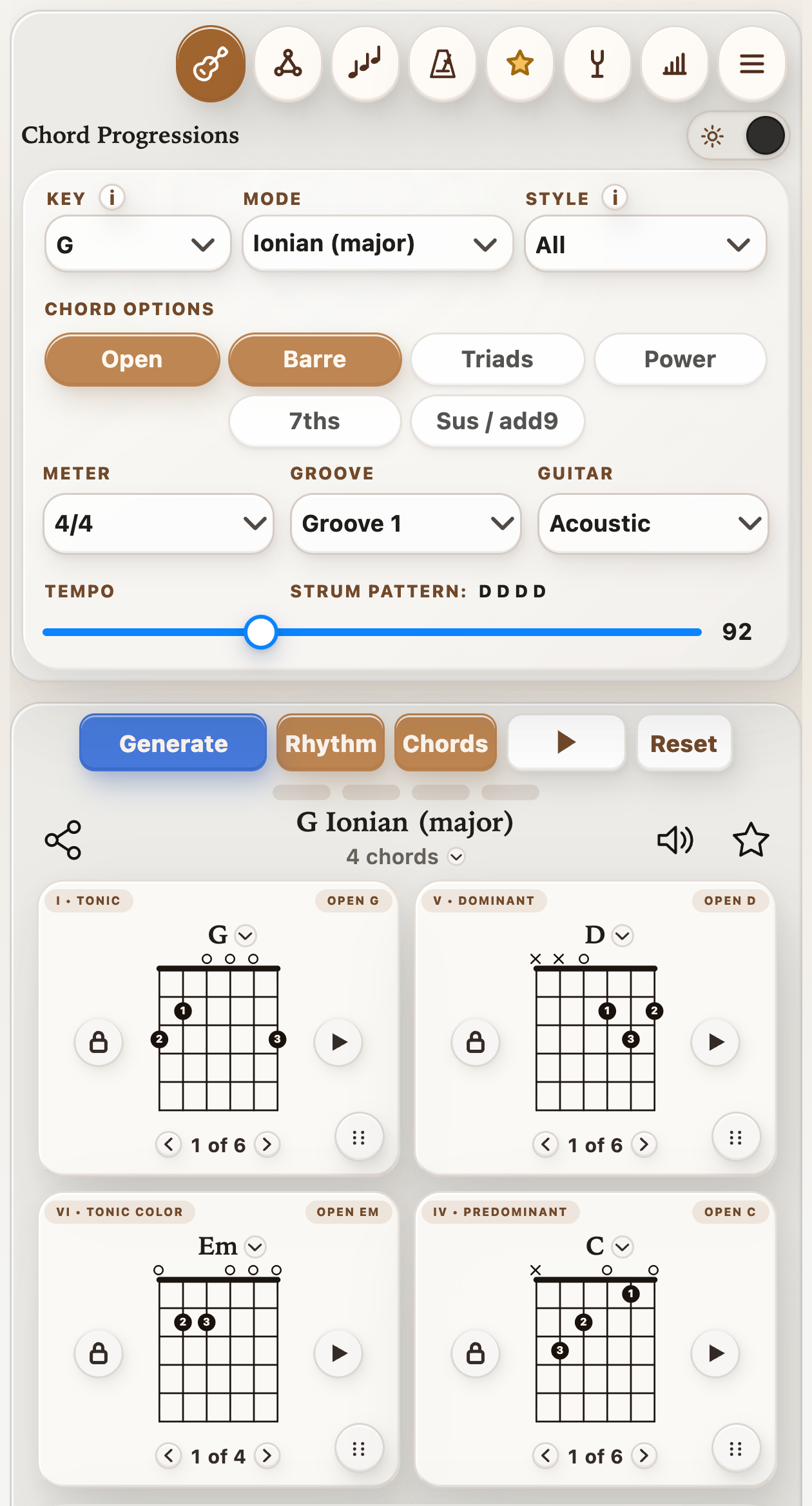
Current StrumForge mobile app showing key, mode, chord options, tempo, groove, and G D Em C chord diagrams
One mobile screen for choosing the harmony, hearing the groove, and following the shapes.

Try it with your guitar

Your first 10-minute guitar practice session

Start with G–D–Em–C in standard tuning. Hear the four chords here, then open the loop in StrumForge to choose a tempo and groove. Aim for clean notes and even changes before adding speed.

G – D – Em – C

I–V–vi–IV in G major · standard tuning

Practice this loop in StrumForge

The preview plays each chord once. Open the app for looping and tempo controls.

  1. 1 minute · Tune and check your sound. Use the tuner’s Standard preset, or your own tuner. Pick each string and listen for a clear note.
  2. 3 minutes · Make the chord changes. Set the loop to 60 BPM and 4/4, with one chord per bar. Strum once per beat; slow down if a change makes you lose the pulse.
  3. 2 minutes · Work on rhythm. Stay on G and play quarter notes with the metronome. Keep the beat steady while you make beat one a little stronger.
  4. 2 minutes · Follow a scale shape. Choose a G major scale shape and a comfortable playback tempo. Play up and back down, keeping each note the same length.
  5. 2 minutes · Find the chord tones. In the Arpeggio Trainer, choose G major and one octave. Play G–B–D slowly, then finish by strumming G and hearing those same notes together.

The full routine uses Pro tools. With the free version, start with the chord loop and repeat the chord-change exercise using your own tuner and metronome. For more structure, follow the daily guitar practice routine.
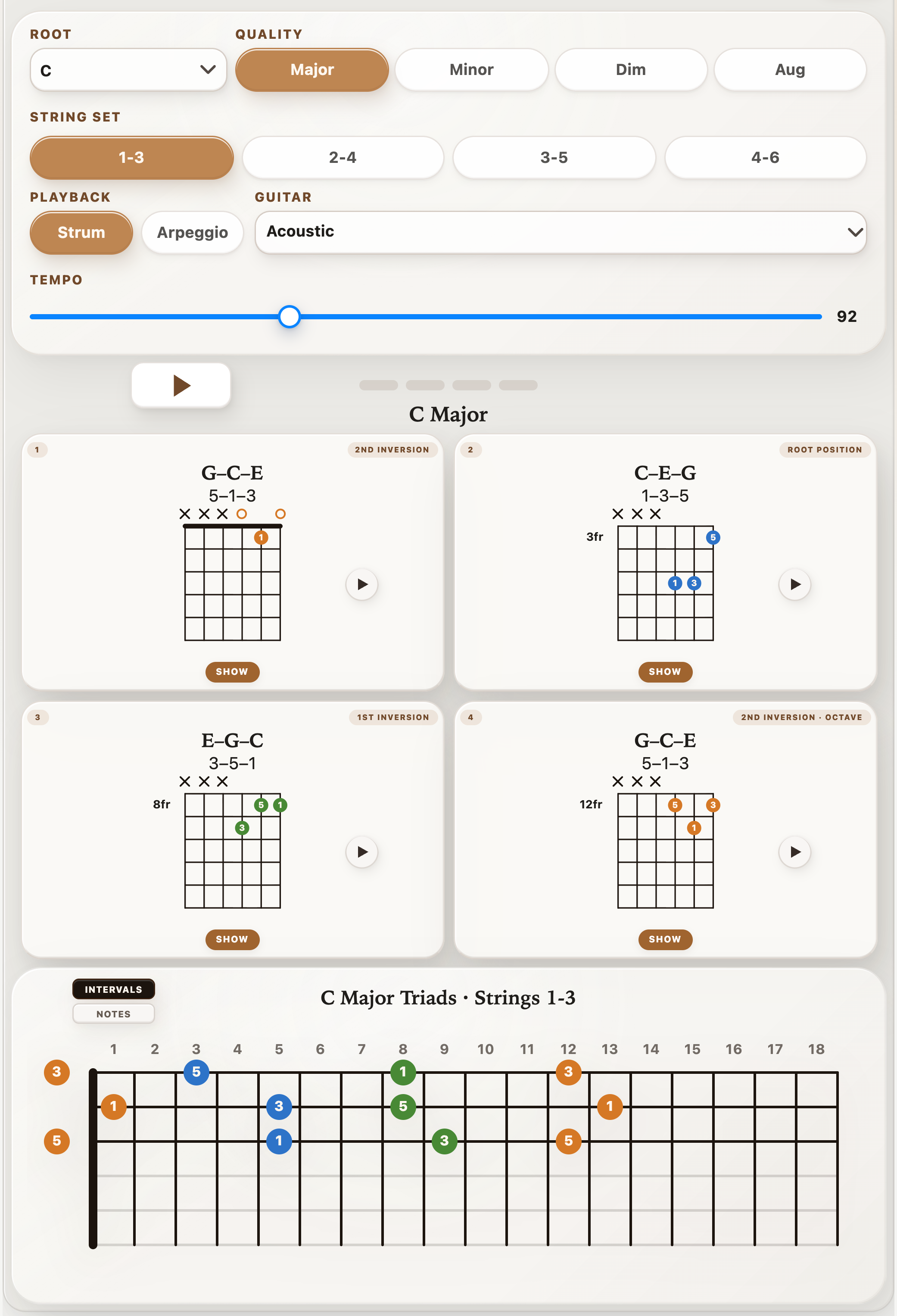
StrumForge Triad Trainer showing C major inversions as chord diagrams and connected fretboard shapes
Triad Trainer connects four ascending voicings to their locations on the fretboard.

Triad Trainer

Practice triad inversions across the fretboard.

Choose any root, select major, minor, diminished, or augmented, and focus on strings 1–3, 2–4, 3–5, or 4–6. StrumForge lays out all three inversions and an octave repeat in ascending fret order, starting with the lowest available voicing so isolated shapes become one navigable map.

  • See note names or intervals inside each shape.
  • Hear one shape or all four with strummed or arpeggiated playback.
  • Set the tempo from 50 to 180 BPM and practice the sequence in time.

Explore the complete Guitar Triad Trainer guide. Free preview; interactive controls and playback require StrumForge Pro.

Scale practice

Practice guitar scales note by note.

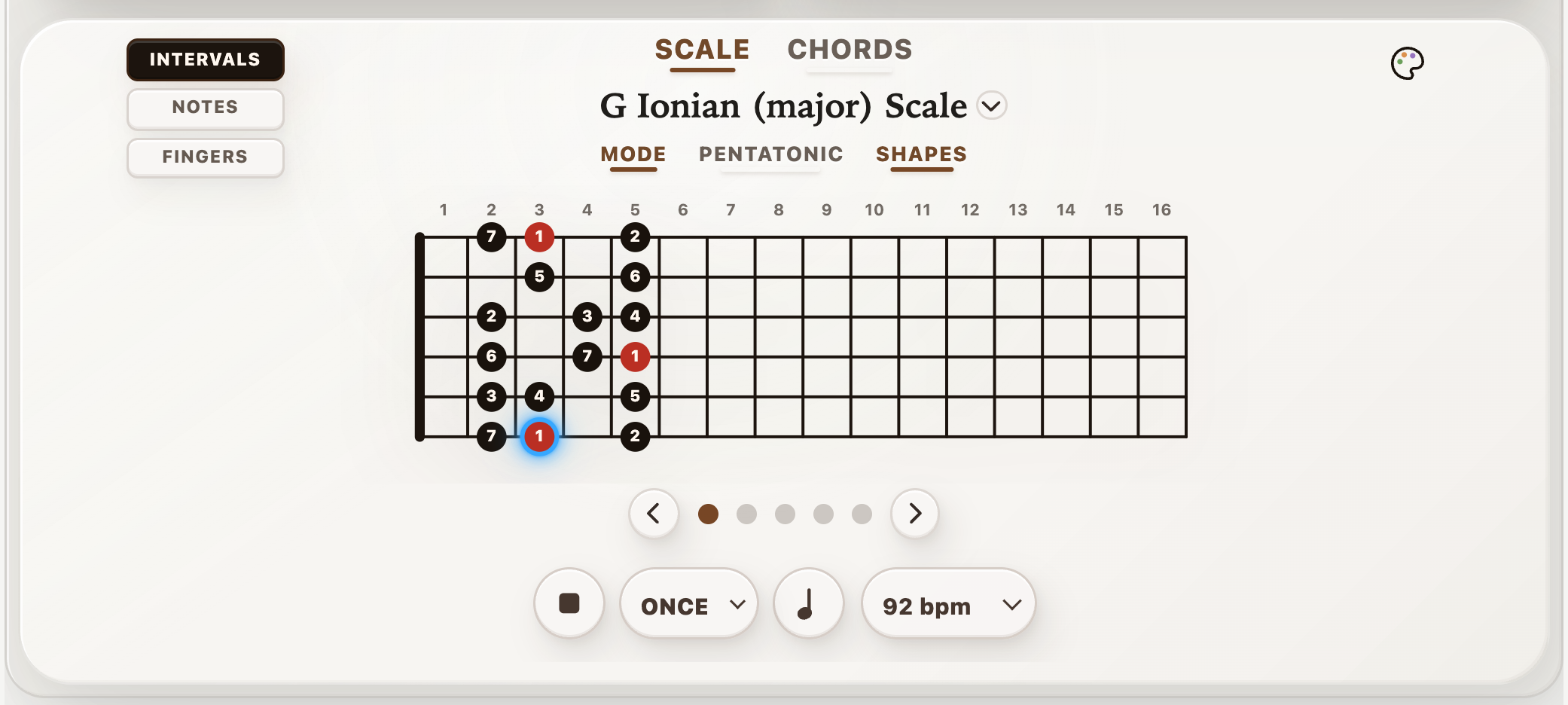
StrumForge includes scale diagrams across keys and modes, including full mode, pentatonic, blues, and CAGED shape views. When you want a guided drill, scale shapes can play note by note while the fretboard highlights what to play next.
  • Set the BPM and practice scale shapes in time.
  • Repeat the current shape or work through all shapes.
  • Connect scale practice to the chord progression, key, and mode you are already using.
Current StrumForge scale practice showing a G major shape, active note highlight, tempo, and playback controls
Scale playback turns the diagram into a timed play-along drill.
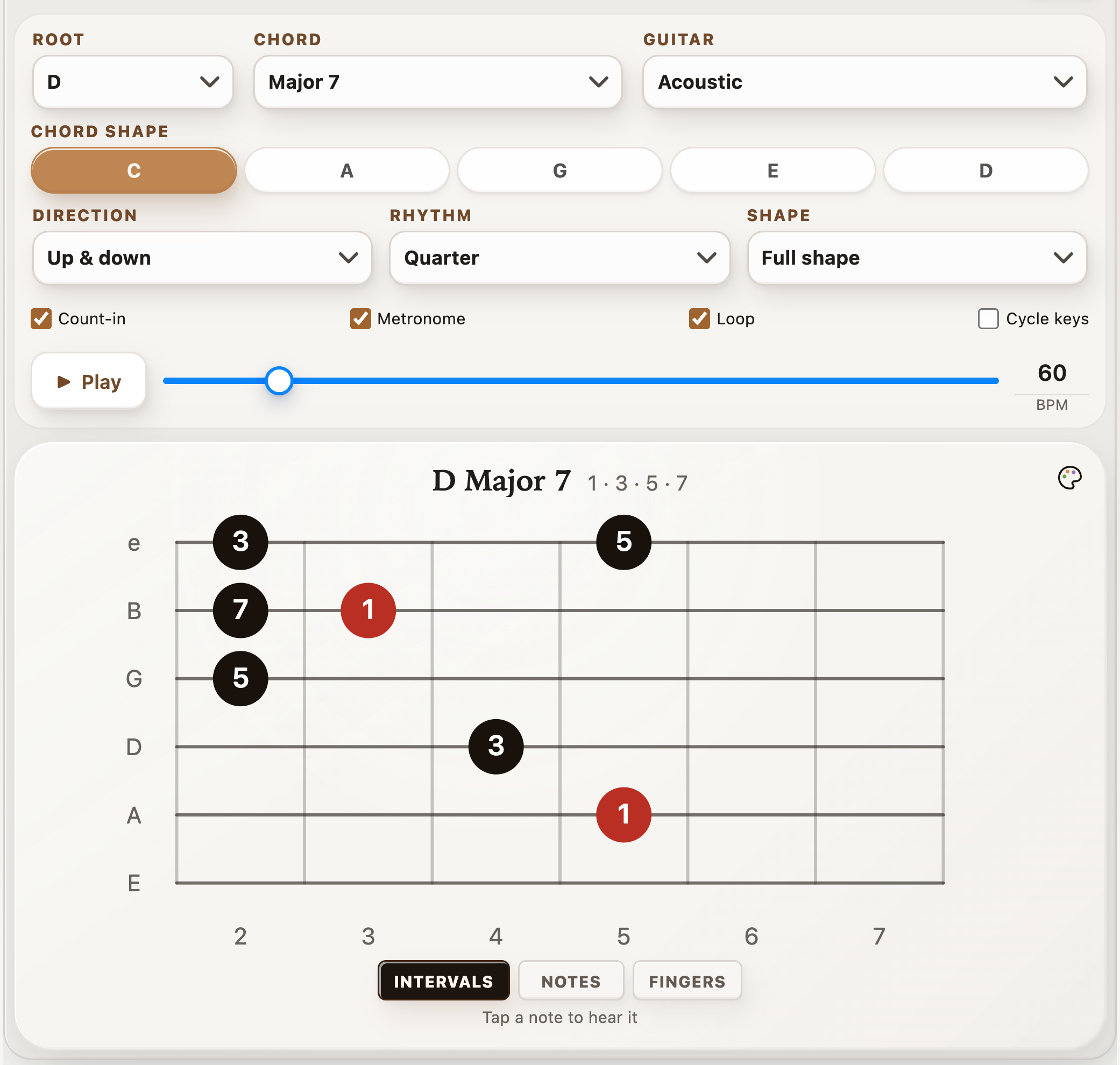
Current Arpeggio Trainer showing a D major 7 CAGED shape, interval labels, and playback settings
Connect chord tones with CAGED shapes, clear labels, and a repeatable playback pattern.

Arpeggio Trainer · StrumForge Pro

Turn arpeggio shapes into melodic lines.

Practice major, minor, major 7, minor 7, and dominant 7 arpeggios in all five CAGED forms. Choose a root and shape, then follow each chord tone across the fretboard with intervals, note names, or finger numbers.

  • Play up, down, or up and down at 40–200 BPM, with quarter notes, eighth notes, triplets, or sixteenths.
  • Focus on one octave or the full shape, with optional count-in, metronome, and looping.
  • Cycle through keys in fourths every four passes while looping to move beyond one familiar key.

Explore the Guitar Arpeggio Trainer guide. Free preview; interactive controls and playback require Pro.

Play-along

Play along with chord progressions in time.

The app is not just a static diagram viewer. Start the groove and the active chord card highlights in time, so timing, strumming, and chord transitions all stay tied to the same pulse.
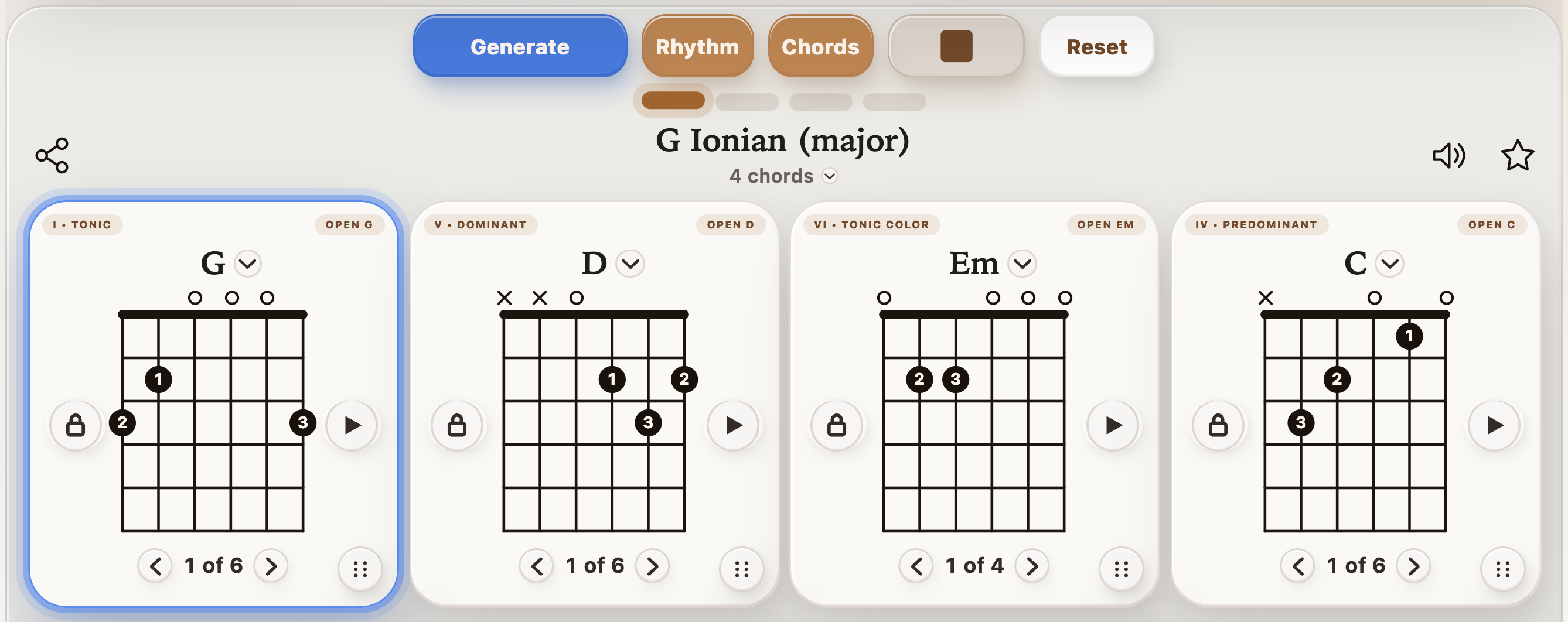
  • Beat pulse and groove controls keep the loop readable at a glance.
  • Chord playback and guitar tone options help the session feel musical instead of mechanical.
  • Highlighted cards make it easier to stay with the form when you are practicing alone.
Current StrumForge app showing G major progression playback and the active chord highlight
Progression controls, chord cards, and the current setup stay visible together on one screen.

Metronome · StrumForge Pro

A full-featured metronome for steadier timing.

Set a tempo from 20 to 400 BPM or tap it in. Choose the beats per bar and beat unit, then adjust each beat’s accent and the subdivisions to match the rhythm you want to practice.
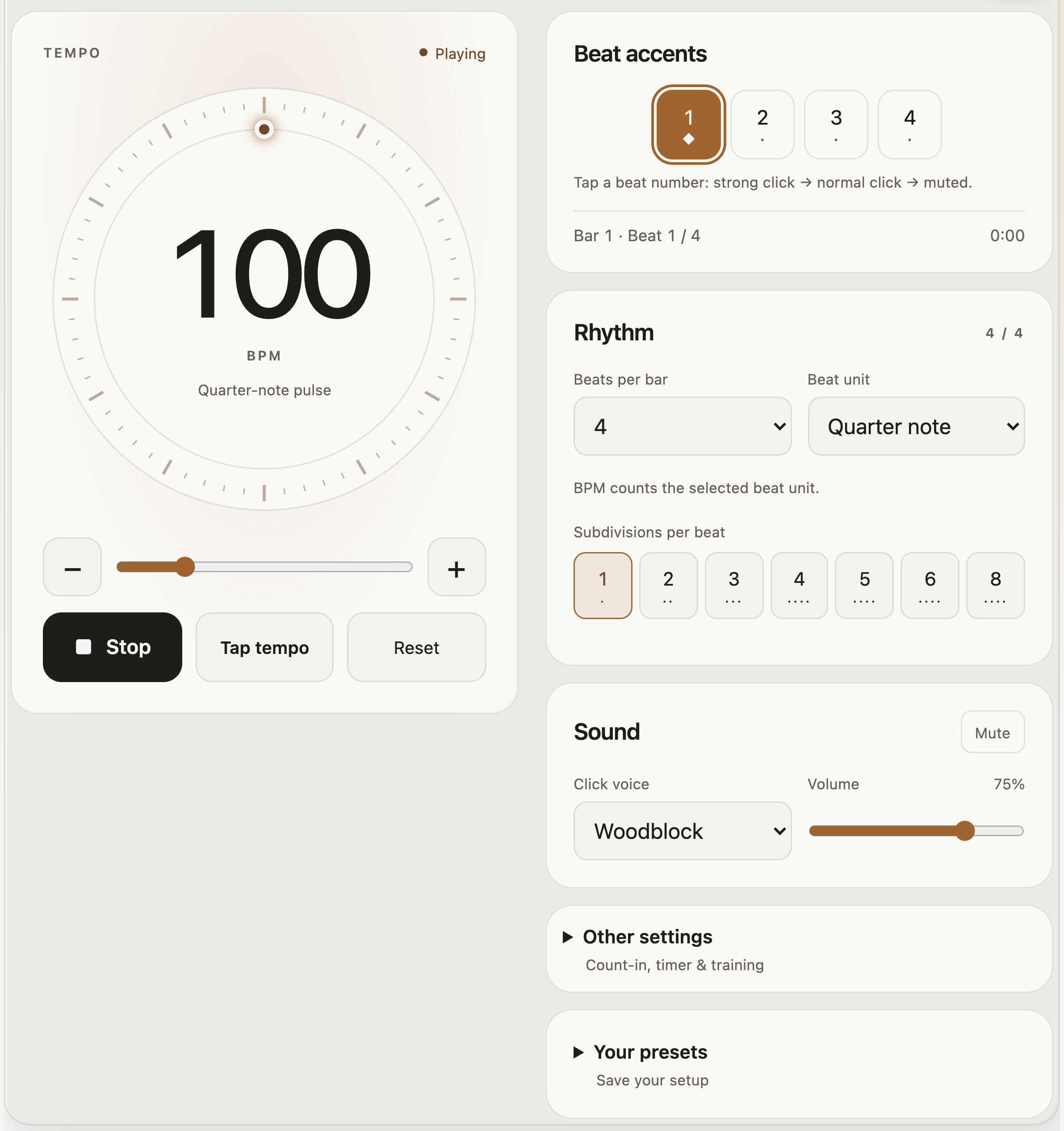
  • Work with straight subdivisions, triplets, or swing, with visual beat feedback and three click sounds.
  • Use a count-in and session timer, or raise or lower the BPM automatically with the tempo trainer.
  • Practice through silent bars to test your internal pulse, and save presets for your next session.
StrumForge metronome at 100 BPM with the tempo dial, beat accents, time signature, and subdivision controls
Start with a clear pulse; customize the meter, accents, and subdivisions around it.
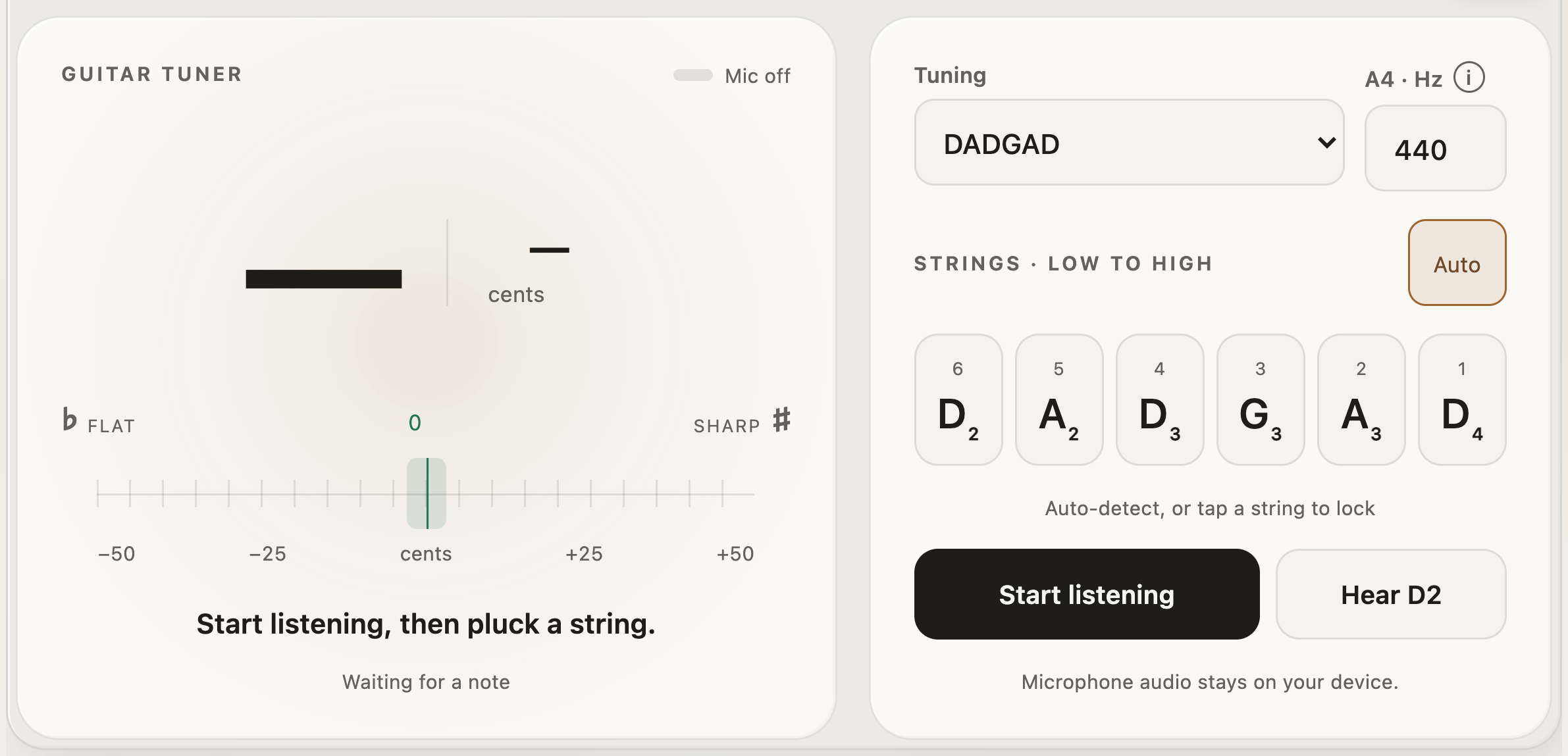
StrumForge tuner with DADGAD selected, D A D G A D string targets, A4 calibration, and listening controls
The DADGAD preset sets all six string targets, ready for you to start listening.

Guitar tuner · StrumForge Pro

A guitar tuner for standard and alternate tunings.

Use the microphone for pitch and cents feedback, with automatic string detection or a locked string target. Start in Standard, or switch the tuning before you explore a different sound.
  • Choose Standard, Drop D, Drop C, half step down, whole step down, DADGAD, Open G, Open D, or Open E.
  • Use chromatic mode for any note, or hear a reference tone for your selected string.
  • Adjust the A4 reference from 430 to 450 Hz when you need to match another instrument.
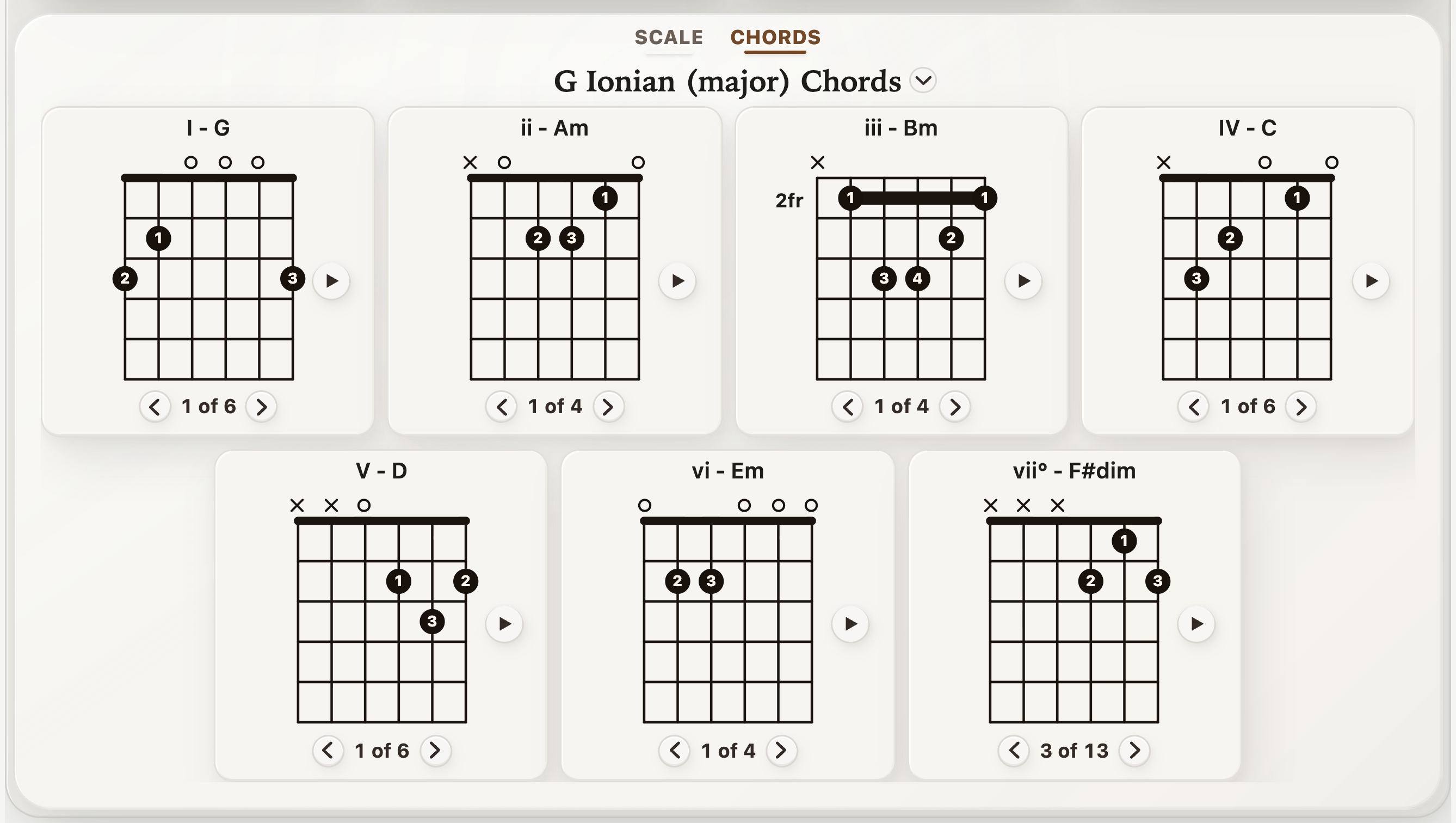
Current StrumForge app showing all seven diatonic chords in G major with playable guitar diagrams
Landscape mode opens up the lower workspace for key and chord context.

Cross-platform practice

Practice on your phone, tablet, or computer.

Open StrumForge in your browser or use the app on iPhone, iPad, and Android. Sign in with the same StrumForge account to access your connected Pro purchase and sync your saved favorites across devices. Keep a progression you like on your phone, then return to it at your computer.

  • Start free on the web without a download or an account.
  • Connect Pro to your account once, then use it across web, iOS, and Android.
  • Stay compact in portrait, or use landscape for more room to follow progressions and explore the fretboard.

Hands-on control

Keep the chords you like. Refine the rest.

Lock a chord when it fits, then generate new ideas around it. Swap a shape when a different voicing feels better under your fingers, or drag a diagram into a position that suits the way you read the loop.
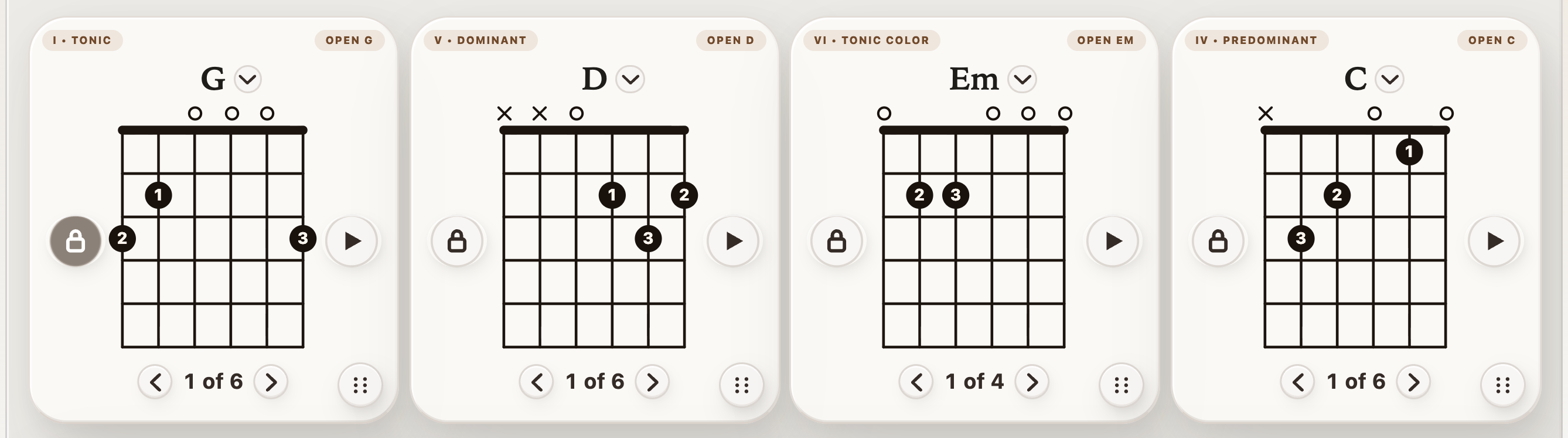
  • Reposition a chord without losing the rest of the loop.
  • Combine movement with chord locks and shape swaps when one part of the progression needs extra focus.
  • Useful when you want a phone-sized layout to feel less cramped and more intentional.
Current StrumForge chord cards with G major locked and shape selectors available for each chord
Lock a chord to keep it in place while you explore the rest of the progression.

Choose your focus

Who is StrumForge for?

Use StrumForge alongside lessons or your own practice plan when you want playable examples, clear fretboard diagrams, and tools for repeating an exercise at your pace.

Building chord confidence

Start with familiar open chords, slow the loop, and focus on one transition. The chord-change practice guide shows how to turn a difficult pair into a manageable exercise.

Exploring the fretboard

Connect scales, triad inversions, and arpeggios instead of memorizing each shape separately. Start with one key and one position, then expand to neighboring shapes.

Writing and improvising

Generate a progression, keep the chords you like, and try a new rhythm or voicing. Use the loop to hear how a melody or short phrase fits the harmony.

Start free, add tools when you need them

What is free, and what does StrumForge Pro include?

StrumForge is free to start in your browser or on iPhone, iPad, and Android. Start without an account; choose Pro when you want the additional practice tools.

Free version

  • Generate four-chord progressions within the free generation allowance.
  • Hear progression playback and follow the chord diagrams.
  • Explore the free previews of the Triad and Arpeggio Trainers.
  • Start playing without creating an account, with no ads.

StrumForge Pro

  • Unlimited generation and longer progressions with 8 or 12 chords.
  • Interactive triad and arpeggio trainers, plus advanced scale practice tools.
  • The guitar tuner and full-featured metronome, including training settings.
  • Saved favorites, practice history, additional sounds, and more customization.
  • Pro access and synced favorites across platforms with your StrumForge account.

The app shows the current free allowance and available Pro plans. See the purchase screen for your platform’s price and billing terms, or visit StrumForge support for subscription and account help.

Before you start

Questions about practicing guitar with StrumForge

Is StrumForge suitable for beginners?

Yes, especially once you are learning basic chord shapes. Start with open chords and a slow tempo, then use the diagrams and playback to work on clean changes. If you are learning how to hold the guitar or fret your first note, use StrumForge alongside a teacher or beginner course.

Can I use it with an acoustic or electric guitar?

Yes. Follow the chord and fretboard diagrams on either instrument and play along with the app’s audio. For microphone tuning, your device needs to hear one clear string at a time.

Does StrumForge listen to my playing and score it?

The tuner uses your microphone to detect pitch. Chord, scale, triad, and arpeggio practice use playback and visual guidance; they do not grade your performance. Listen for clean notes and steady timing as you follow the exercise.

Do alternate tunings change the chord and scale diagrams?

The alternate-tuning presets apply to the tuner. The chord, scale, triad, and arpeggio diagrams use standard guitar tuning. Tune back to Standard before following those diagrams, or account for the changed string pitches yourself.

Can I use the same account on web, iPhone, iPad, and Android?

Yes. Use the same StrumForge account on the website and in the mobile apps to access connected Pro and sync your saved favorites. If you purchased Pro in a mobile app, sign in there first to connect the purchase to your account, restoring purchases there if needed. Then sign in with that same account on your other devices. For a web purchase, use the account you used at checkout. See help accessing Pro across devices for the steps.

An account is optional for free use. Open the G–D–Em–C example in the web app to start practicing in your browser.