

StrumForge
Best for turning chord ideas into playable guitar loops with diagrams, playback, voicing controls, and scale context.
Use it at the start of a writing session or when a section needs a better guitar part.
Guitar songwriting apps
A practical guide to songwriting apps for guitarists, comparing tools for playable chord ideas, melody planning, chord templates, recording, and quick song capture.
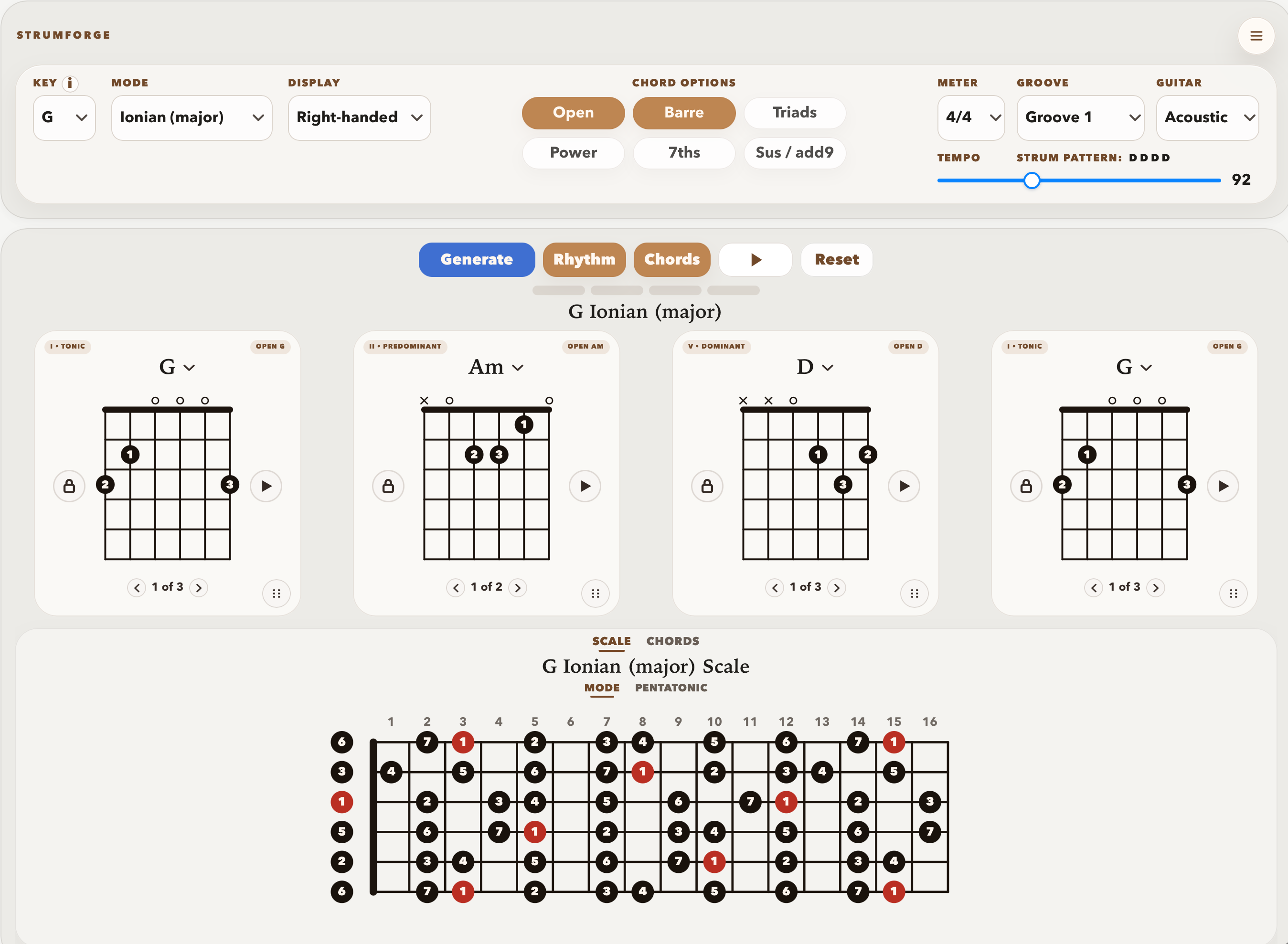
For guitarists, StrumForge is the best fit for the first playable chord idea: generate a progression, hear it, follow diagrams, adjust voicings, and practice it in time. Hookpad is better for theory-guided composition and melody planning. ChordChord is useful for broader chord ideas and templates. A recording app or DAW is better once the song needs audio tracks, vocals, and production.
Songwriting is not one task. The best app changes depending on whether you are finding chords, shaping melody, practicing the part, or recording a demo.
Best for turning chord ideas into playable guitar loops with diagrams, playback, voicing controls, and scale context.
Use it at the start of a writing session or when a section needs a better guitar part.
Best for theory-guided songwriting, melody writing, chord function, arrangement sounds, and export.
Use it when the song needs structure beyond the guitar part.
Best for broad chord ideas, templates, and a general music-maker workflow.
Use it when you want chord inspiration without a strictly guitar-first interface.
Best for capturing vocals, guitar takes, layers, edits, and finished demos.
Use it after the chord idea is strong enough to record.
These notes focus on real use, not feature-counting. The useful question is what each tool helps a guitarist do next.
Best for the first playable guitar loop.
Use StrumForge when the blank page problem is harmonic: you need chords, timing, playable shapes, and enough scale context to start writing or improvising.
Move to another tool when the idea needs vocals, lyrics, recording, or arrangement.
Best for composition planning.
Hookpad is a better fit when you are writing chords and melody together or need a more theory-aware sketch of the song.
It is not the fastest path if all you need is a guitar loop to try right now.
Best for broad chord inspiration.
ChordChord is useful when you want a more general chord idea tool with templates and chord-learning surfaces.
It is less instrument-specific than a guitar-first progression tool.
Best for capturing the song.
A DAW or recorder is the right place for vocals, guitar takes, layers, editing, collaboration, and finished demos.
It is usually not the fastest place to discover whether the chord loop itself is worth keeping.
Use this as the fast decision guide before opening another app or rebuilding the same idea somewhere else.
| Decision point | Recommendation |
|---|---|
| You need the first playable chord loop | Use StrumForge. It helps you find, hear, adjust, and practice the guitar part before the song becomes a production project. |
| You are writing melody and harmony together | Use Hookpad. It is stronger when theory, melody, arrangement, and export matter. |
| You want broad chord ideas or templates | Use ChordChord. It is useful for chord inspiration before committing to a specific guitar part. |
| You are ready to record vocals or guitar takes | Use a DAW or recording app. StrumForge helps create the part, but recording and mixing belong elsewhere. |
| You are stuck at the blank page | Start with StrumForge if you are writing on guitar. Move only when the song needs lyrics, arrangement, or recording. |
StrumForge is strongest at the moment before a song becomes a production project.
Many guitar songs start with a loop: a verse feel, a chorus lift, a bridge change, or a riff-friendly vamp. StrumForge is built for that stage. It helps you generate the progression, hear the timing, follow the chord diagrams, and test whether the idea is playable.
Once the song needs lyrics, vocals, arrangement, recording, or mixing, move to the tool built for that job. StrumForge is not a DAW. It is the part of the workflow that helps a guitarist get from blank page to usable harmony quickly.
This comparison checks the public product pages against a guitarist's actual sequence: find the loop, hear it, play the shapes, revise the weak spot, then decide whether the idea should become a practice drill, song section, or recording.
| Tool | What we looked at |
|---|---|
| Hookpad | Reviewed Hookpad pages for theory-guided songwriting, melody tools, arrangement sounds, MIDI, export, and Aria. |
| ChordChord | Reviewed the public ChordChord page for Chord Studio, templates, Learn Chords, and track separation navigation. |
Short answers for players using this page as a practice or writing reference.
For first chord ideas and playable guitar loops, StrumForge is the best fit. For melody and deeper composition, Hookpad is stronger. For recording, use a DAW or recording app.
No. StrumForge helps create and practice guitar progressions. A DAW is still the right tool for recording, editing, mixing, and producing finished demos.
A guitar-specific tool helps you judge the part by sound, timing, and hand shape instead of treating the progression as abstract chord names.
Yes. A common workflow is to find and practice the progression in StrumForge, then record or arrange the song in another app.