An open-ended return: G – Bm – C – Am
Let Am ring, then listen to the move back to G. Keep one light strum per chord so you can hear the harmony.


A fresh idea. A part worth playing.
Find your next guitar idea with a random progression of 2, 3, 4, 8, 12, or 16 chords. Hear it, play it, and keep the changes that make you want to play another pass.
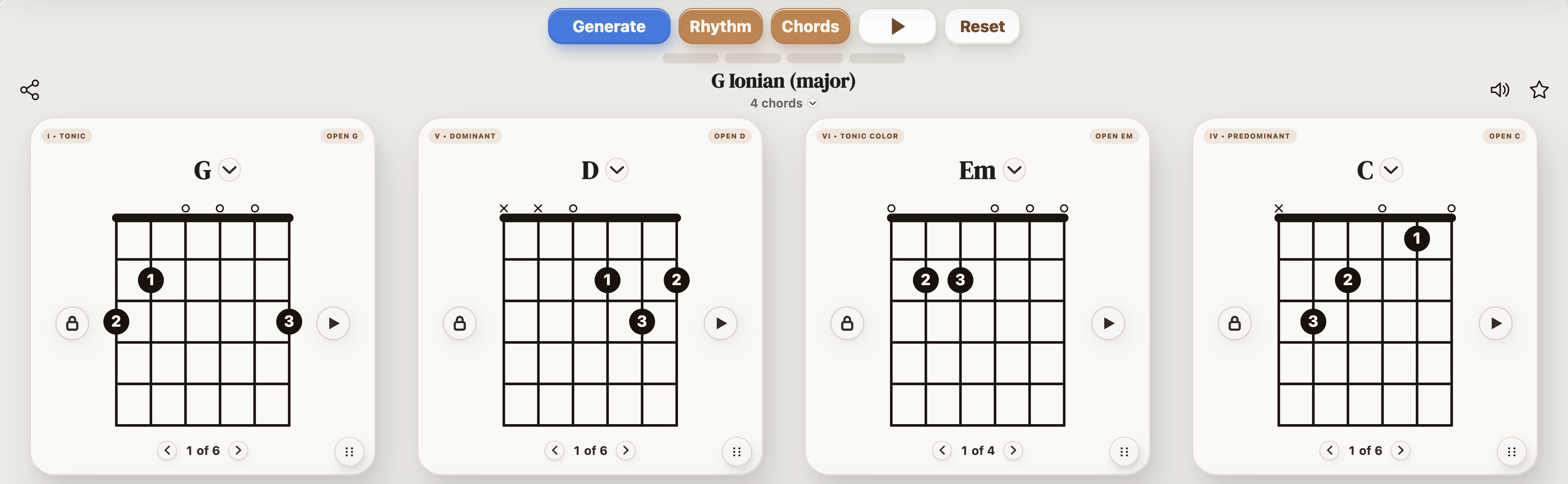
Start small when you want to work on a groove. Choose a longer sequence when you want more room for a melody or a change of direction.
| Chords | Try it for |
|---|---|
| 2 | A short vamp for a riff, groove, or focused chord-change drill. |
| 4 | A compact loop you can learn quickly and repeat. |
| 8 | A longer phrase, with room to vary the second half. |
| 12 | A longer section you can edit chord by chord. |
| 16 | A section with room to develop and return to an idea. |
Playback advances one chord per bar. A 12-chord result still needs the right chord pattern to work as a 12-bar blues.
One useful change is enough. Spend a few minutes developing it before asking the generator for another idea.
These two four-chord examples keep G–Bm–C and change only the last chord. Preview both, then open the one you like in StrumForge for repeating playback and tempo controls.
Let Am ring, then listen to the move back to G. Keep one light strum per chord so you can hear the harmony.
D is the V chord in G major. Compare its return to G with the Am ending above. Choose the version that supports your melody.
| If the idea feels… | Try this next |
|---|---|
| Hard to play | Keep the chord names and choose nearby voicings. |
| Flat when it loops | Replace the final chord and listen to the return. |
| Too busy | Use fewer strums, a slower tempo, or a shorter progression. |
| Too familiar | Change the chord order, try a different mode, or add one seventh, sus, or add9 chord. |
For example, G–D–Em–C can become G–Dsus2–Em7–Cadd9. The root movement stays the same while the upper notes change the texture. Try that before extending every chord.
| Your goal | Starting settings | What to listen for |
|---|---|---|
| Clean chord changes | 4 chords · G major · Open chords · 60–80 BPM | An even pulse through the last-to-first change. |
| A riff or groove | 2 chords · a key you know · Power chords | A rhythm you can repeat without rushing. |
| A verse idea | 8 chords · a chosen key · Open or Barre chords | A phrase that develops in the second half. |
These are starting points. Slow down, simplify the shapes, or change the chord family until the result feels comfortable under your fingers.
Play once with a strum on each change. On the next pass, pick the chord tones and follow the highest note as a melody. Then keep your favorite rhythm and sing a short phrase over it.
In StrumForge, open Rhythm with the drum-kit button beside BPM to choose a backing groove. Keep the drums steady while you try your own strumming.
For a solo, choose a key and start with a chord tone on each change. If you replace a chord, check its notes before reusing the same scale. Follow the chord-tone soloing exercise for a simple four-bar starting point.
Choose 2, 3, 4, 8, 12, or 16 chords per progression.
Yes. Lock the chord positions you want to keep, then generate a variation around them. You can also replace one chord manually, reorder the cards, or choose another available voicing.
Your key, mode, style, and chord options guide the result. Leave settings open for more variety, or choose a key and chord family for a more focused starting point.
Yes. Use a progression as the starting point for a riff, melody, verse, or chorus. Develop the rhythm and melody yourself, then record the part when it feels worth keeping.