

StrumForge
Best for guitarists who want playable progressions with diagrams, playback, voicing controls, and scale context.
Use it when you want to generate a loop and start playing it right away.
Guitar songwriting tools
A practical comparison of chord progression generators for guitarists, focused on playable output, chord diagrams, playback, editing speed, and songwriting use.
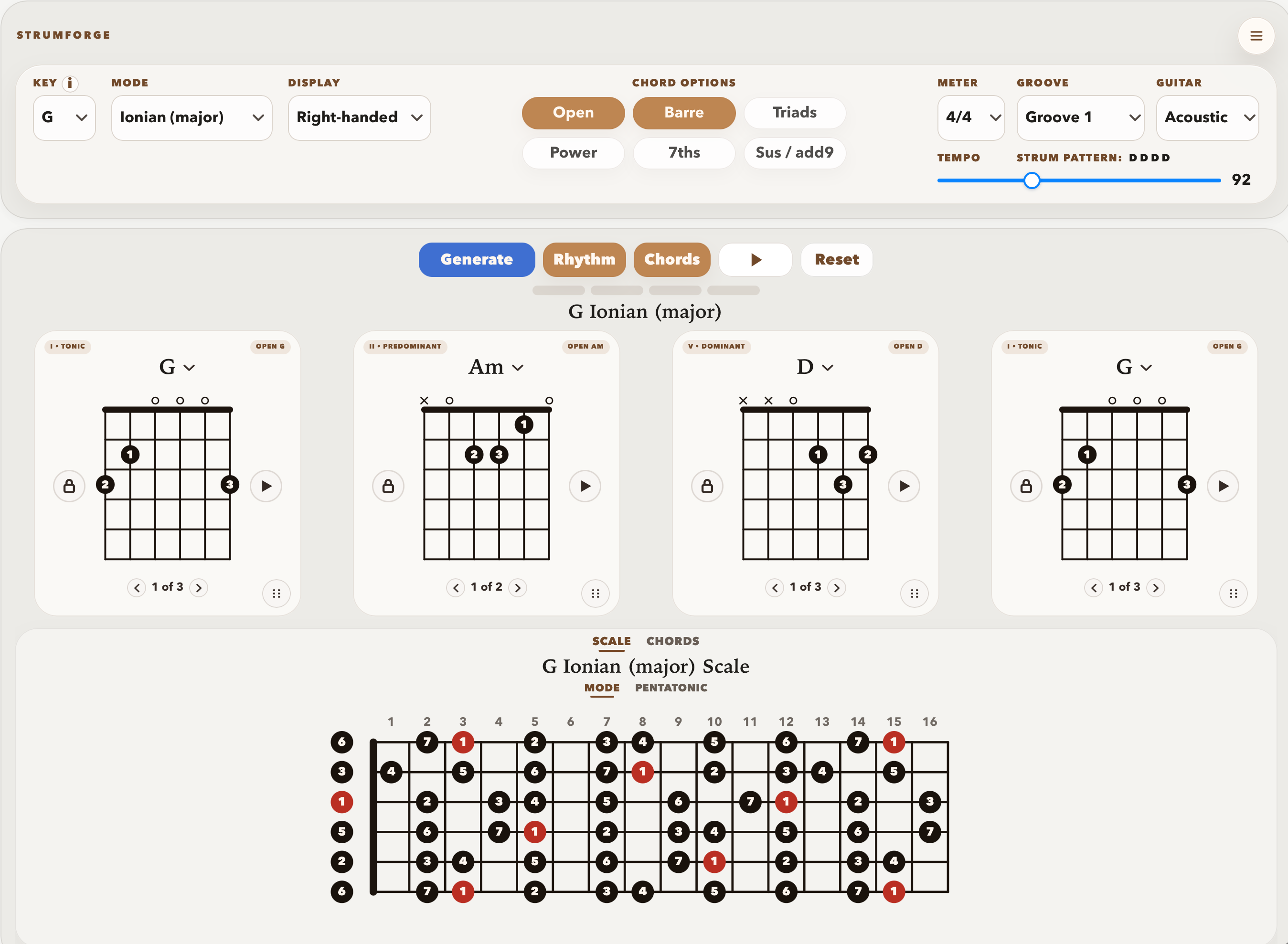
For guitarists, StrumForge is the strongest fit when you want a generated progression you can play immediately: chord diagrams, groove playback, voicing options, tempo control, and scale context stay in the same workflow. AutoChords is better for a very quick text-style prompt. Hookpad is better for deeper theory, melody, and arrangement planning. ChordChord is a broader chord idea tool with templates and production-adjacent features.
Start with the job you need the tool to do. A fast prompt, a playable guitar loop, and a full songwriting workspace are different workflows.
Best for guitarists who want playable progressions with diagrams, playback, voicing controls, and scale context.
Use it when you want to generate a loop and start playing it right away.
Best for a quick progression prompt by feel and key.
Use it when you want a fast starting idea before adapting the chords to guitar yourself.
Best for theory-driven songwriting, melody writing, arrangement, MIDI, and export.
Use it when the song needs composition tools beyond a guitar practice loop.
Best for a broader chord idea workflow with templates and music-maker features.
Use it when you want a general chord tool rather than a guitar-specific practice surface.
These notes focus on real use, not feature-counting. The useful question is what each tool helps a guitarist do next.
The most direct pick for guitarists.
StrumForge is strongest when you want the generated idea to become a playable guitar part immediately. The chord names, diagrams, playback, voicing options, and scale view all stay together, so you can judge the progression by sound and feel instead of copying it into another tool first.
It is not a full DAW or notation system. If the next step is recording, arranging, or exporting a finished song sketch, pair it with another app.
The fastest lightweight prompt.
AutoChords is useful when you want a quick progression from a feel and key, plus a few alternatives and chords in the key. It is simple and low-friction.
It does not solve the guitar-specific question: which shapes should I play, how does the loop feel in time, and what should I practice next?
The deeper composition workspace.
Hookpad is the better fit when harmony, melody, arrangement sounds, MIDI input, export, and theory guidance matter. It is built for a fuller songwriting environment, not just a quick guitar loop.
That extra depth can be more setup than a guitarist needs when the immediate goal is to play a progression.
The broader chord idea tool.
ChordChord is useful when you want a general chord progression surface with templates and adjacent music-maker features.
It is less focused than StrumForge on turning a progression into a guitar practice loop with diagrams and scale context.
Use this as the fast decision guide before opening another app or rebuilding the same idea somewhere else.
| Decision point | Recommendation |
|---|---|
| You want a playable guitar loop now | Choose StrumForge. The result includes the chord names, diagrams, playback, voicing controls, tempo, and scale context you need to start playing. |
| You want the fastest rough progression prompt | Choose AutoChords. It is useful when you only need a quick key-and-feel idea and will handle the guitar part yourself. |
| You are composing melody and harmony together | Choose Hookpad. It is the better fit when the song needs theory guidance, melody tools, arrangement sounds, MIDI, or export. |
| You want broad chord inspiration and templates | Choose ChordChord. It makes sense when you want a general chord idea surface rather than a guitar-specific practice view. |
| You are deciding what to practice next | Choose StrumForge. A loop with diagrams and playback is more useful for guitar practice than a static list of chords. |
StrumForge is intentionally narrower than a full songwriting workstation.
Choose StrumForge when the useful outcome is a playable guitar loop. The app keeps the generated progression, chord diagrams, groove playback, tempo, voicing filters, manual chord changes, and scale views close together. That matters when you are holding a guitar and trying to decide whether an idea actually works.
Choose a broader tool when you need notation, arrangement planning, audio recording, track production, or full melody composition. StrumForge is not trying to replace those workflows. Its advantage is speed from idea to playable guitar part.
This comparison checks the public product pages against a guitarist's actual sequence: find the loop, hear it, play the shapes, revise the weak spot, then decide whether the idea should become a practice drill, song section, or recording.
| Tool | What we looked at |
|---|---|
| AutoChords | Reviewed the public AutoChords page for feel, key, randomize, alternatives, and all-chords-in-key behavior. |
| Hookpad | Reviewed Hookpad pages for theory tools, melody and chord writing, arrangement sounds, MIDI, export, and Aria. |
| ChordChord | Reviewed the public ChordChord page for Chord Studio, templates, Learn Chords, and track separation navigation. |
Short answers for players using this page as a practice or writing reference.
StrumForge is the best fit when the next step is playing the progression on guitar. It keeps generated chords, diagrams, playback, voicing controls, and scale context together.
Use AutoChords when you want a quick key-and-feel progression idea and do not need guitar diagrams or an integrated practice view.
Use Hookpad when you want a more complete composition workspace with melody tools, arrangement sounds, MIDI, export, and deeper theory support.
Use ChordChord when you want a broader chord idea and music-making surface with templates or production-adjacent tools rather than a guitar-first practice view.